
從 PRTG 遷移至 WhatsUp Gold 終極指南
發布日期:2026/03/09
從 PRTG 遷移到 WhatsUp Gold 可能看起來有些複雜,但只要採取正確的方法,整個過程其實相當順暢,並能讓您解鎖更強大的監控能力,同時享有更簡化的使用體驗。
WhatsUp Gold 提供直覺化儀表板、彈性的授權模式,以及多項進階功能,例如 Network Traffic Analysis(網路流量分析)、Application Monitoring(應用程式監控),以及整合式 Network Detection & Response(NDR),讓企業能在混合環境中獲得更全面的可視性。
在本指南中,我們將帶您了解 五個關鍵步驟,協助您順利完成遷移,同時說明為什麼越來越多 IT 團隊選擇從 PRTG 轉換至 WhatsUp Gold。
遷移前檢查清單(Pre-Migration Checklist)
在開始之前,請先確認以下事項:
- 驗證 WhatsUp Gold 系統需求(作業系統、SQL Server)
- 確認授權需求(建議使用 Enterprise Plus 以取得完整功能)
- 備份 PRTG 的設定檔
- 準備所有必要的存取憑證(SNMP、WMI、API)
- 盤點並確認關鍵設備與服務
Step 1:盤點所有存取憑證
首先,請整理在 PRTG 中用於裝置存取的所有憑證,包括 SNMP、WMI 以及 API 憑證。完整盤點這些資訊,可以確保在 WhatsUp Gold 中進行裝置探索與監控時更加順暢。
WhatsUp Gold 的優勢:
- 集中式憑證管理庫(Credential Library),可安全儲存並輕鬆更新憑證
- 在進行裝置探索(Discovery Scan)時,系統可自動套用對應憑證
在 PRTG 中,憑證通常會從群組(Group)層級繼承,並可依需求進行覆寫。而在 WhatsUp Gold 中,每個裝置會針對不同的憑證類型使用各自的專屬憑證。
當您從 PRTG 整理好所有憑證並釐清其繼承關係後,只需將這些憑證新增至 WhatsUp Gold 的 Credential Library。之後在進行裝置探索掃描時,系統即可使用這些憑證,並自動將適當的憑證套用至對應的裝置。
透過在探索階段提供正確的憑證,WhatsUp Gold 能夠更準確識別裝置,並自動關聯適合的監控項目(Monitors)。
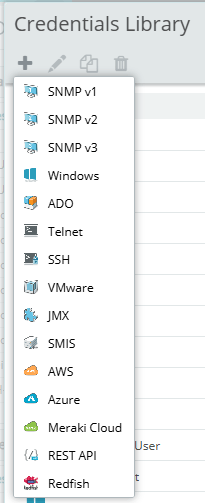
Tip:在執行首次發現掃描之前,請將所有憑證新增至 WhatsUp Gold 憑證庫(Credential Library)。
Step 2:探索並監控您的 IP 位址
使用 WhatsUp Gold 的二層/三層功能,您可以自動掃描網路,並建立與維護整體環境的拓撲地圖。 在 WhatsUp Gold 中,每個裝置群組(Device Group)都會對應自己的自動拓撲地圖與自訂拓撲地圖。此外,一個裝置也可以同時屬於多個群組,且不會影響授權計算。此功能提供可視化的拓撲圖,與 PRTG 基於感測器的方法相比,可以更輕鬆地驗證網路覆蓋範圍並識別網路盲區。
為什麼 WhatsUp Gold 比 PRTG 更勝一籌:
- 監控裝置可同時屬於多個裝置群組,且不會影響授權數量
- 每個裝置群組皆提供自動拓撲圖與自訂拓撲圖,可用於監控驗證、缺口分析與儀表板呈現
遷移方案
- Manual / UI 方式:若可行,從 PRTG 匯出 IP 位址,並將其貼到 WhatsUp Gold 的「New Discovery Scan」 中。
- API / Scripting 方式:使用 WhatsUpGoldPS PowerShell 模組 進行自動化處理。
Manual / UI 操作方式
檢視 PRTG 的自動探索群組(Auto-Discovery Groups),並複製相關資訊以備後用。如果可行,也可以嘗試從 PRTG UI 匯出資料(我在自己的環境中操作時遇到一些困難)。接著,將這些 IP 位址與主機名稱(Hostnames) 貼到 WhatsUp Gold 的「New Discovery Scan」 中,即可開始裝置探索。
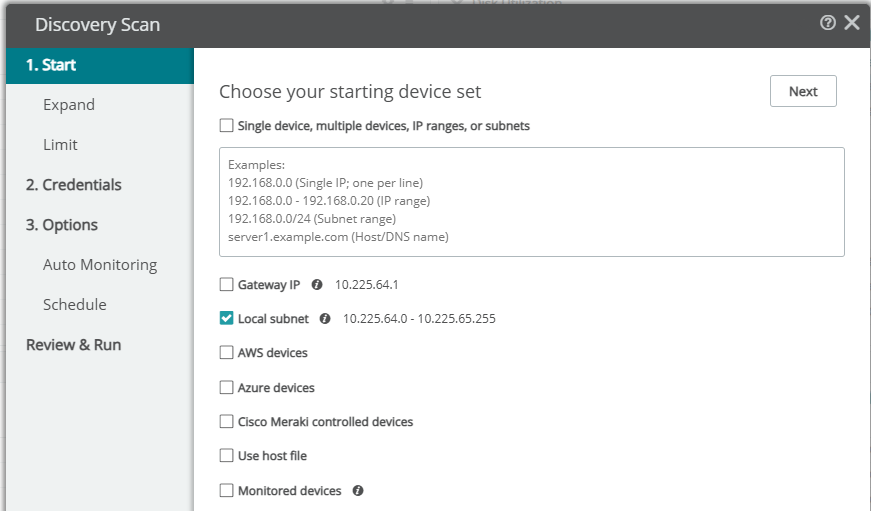
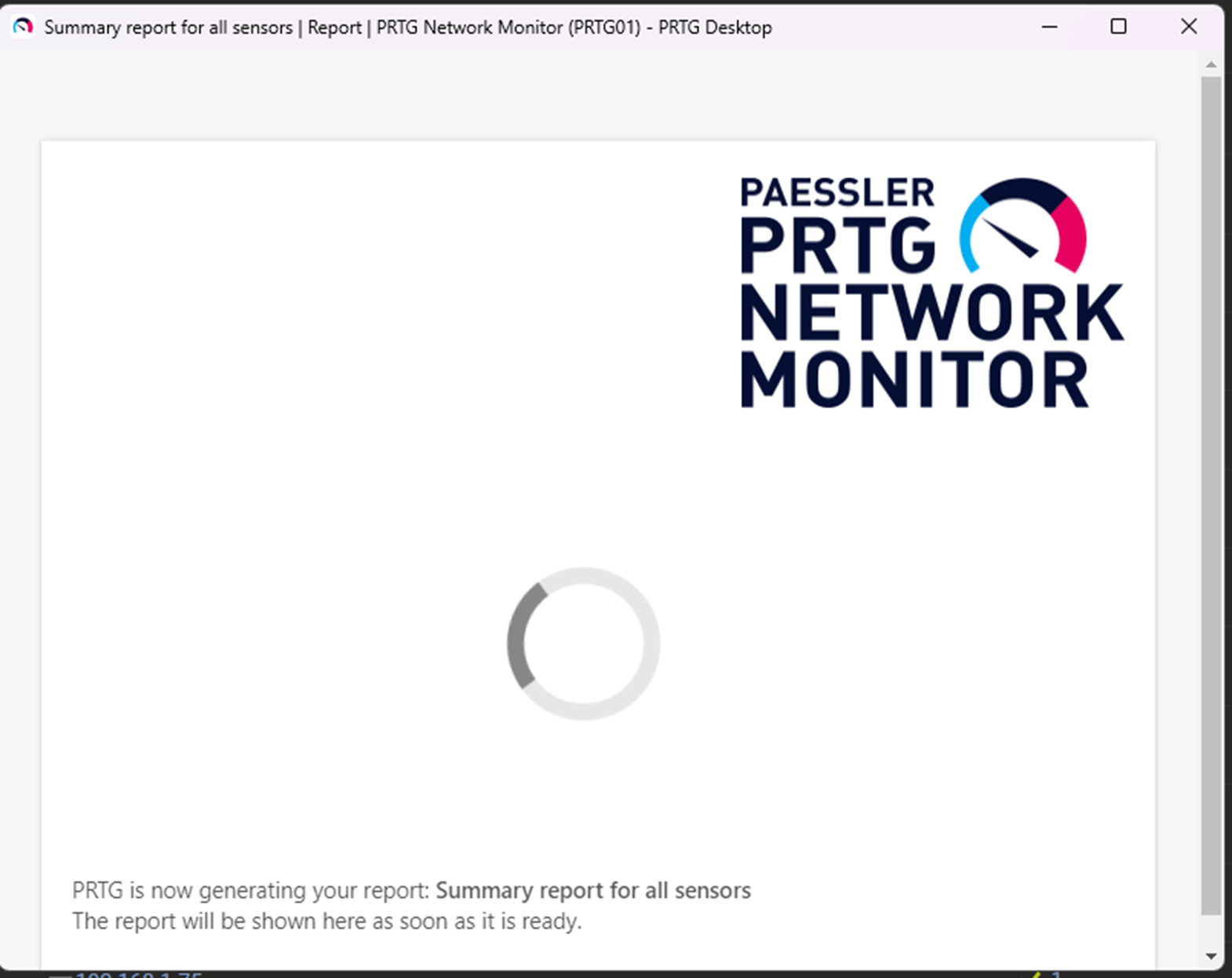
如果你的環境規模較小,你可以選擇從 PRTG 的使用者介面匯出 IP 位址和主機名稱(如果可以的話!)。但我因為有超過 1000 筆記錄而無法匯出,報告一直卡住不動。所有匯出選項對我來說都無效,而使用者介面中直接提供的 XML 匯出選項也不理想。
API / Scripting 方式
我不想透過 PRTG UI 一筆一筆複製貼上,感覺很混亂。後來我發現有一個非官方的 PRTG PowerShell 模組,可以透過 PRTG API 操作資料。最終,我使用了 WhatsUp Gold 的 PowerShell 模組 WhatsUpGoldPS,只要執行一個指令,就能輕鬆把 IP 位址清單匯入到 WhatsUp Gold 伺服器 😊
# ---- Config ----
$PrtgServer = '192.168.74.104'
$WugServer  = '192.168.74.74'
$WugProtocol = 'https'
$IgnoreSslErrors = $true  # set $false if you want strict SSL

# ---- Install modules if required & import them
try {
    if (-not (Get-Module -ListAvailable -Name 'PrtgAPI')) {Install-Module PrtgAPI -Scope CurrentUser -Force -AllowClobber}
    Import-Module PrtgAPI -ErrorAction Stop
    if (-not (Get-Module -ListAvailable -Name 'WhatsUpGoldPS')) {Install-Module WhatsUpGoldPS -Scope CurrentUser -Force -AllowClobber}
    Import-Module WhatsUpGoldPS -ErrorAction Stop
}
catch {
    throw "Module install/import failed: $($_.Exception.Message)"
}

# ---- Credentials ----
if (-not $PRTGCred) { $PRTGCred = Get-Credential -Message "Enter PRTG username and password" }
if (-not $WUGCred)  { $WUGCred  = Get-Credential -Message "Enter WhatsUp Gold username and password" }

# ---- Connect to PRTG and collect IPs/Hostnames ----
try {
    if ($IgnoreSslErrors) {
        Connect-PrtgServer -Server $PrtgServer -Credential $PRTGCred -IgnoreSSL -Force | Out-Null
    } else {
        Connect-PrtgServer -Server $PrtgServer -Credential $PRTGCred -Force | Out-Null
    }

    $devices = Get-Device
    if (-not $devices) { throw "No devices returned from PRTG." }

    $ipList = $devices |
        Where-Object { $_.Host -and $_.Host.Trim() } |
        ForEach-Object { $_.Host.Trim() } |
        Sort-Object -Unique

    if (-not $ipList -or $ipList.Count -eq 0) { throw "No usable Host values found on PRTG devices." }
}
catch {
    throw "PRTG step failed: $($_.Exception.Message)"
}

# ---- Connect to WhatsUp Gold and add devices ----
try {
    if ($IgnoreSslErrors) {
        Connect-WUGServer -serverUri $WugServer -Protocol $WugProtocol -IgnoreSSLErrors -Credential $WUGCred | Out-Null
    } else {
        Connect-WUGServer -serverUri $WugServer -Protocol $WugProtocol -Credential $WUGCred | Out-Null
    }

    Add-WUGDevice -IpOrName $ipList
    Write-Host "Added/submitted $($ipList.Count) targets to WhatsUp Gold."
}
catch {
    throw "WUG step failed: $($_.Exception.Message)"
}
Step 3:轉換警示與動作
PRTG 的通知與自動動作需要在 WhatsUp Gold 中重新建立。
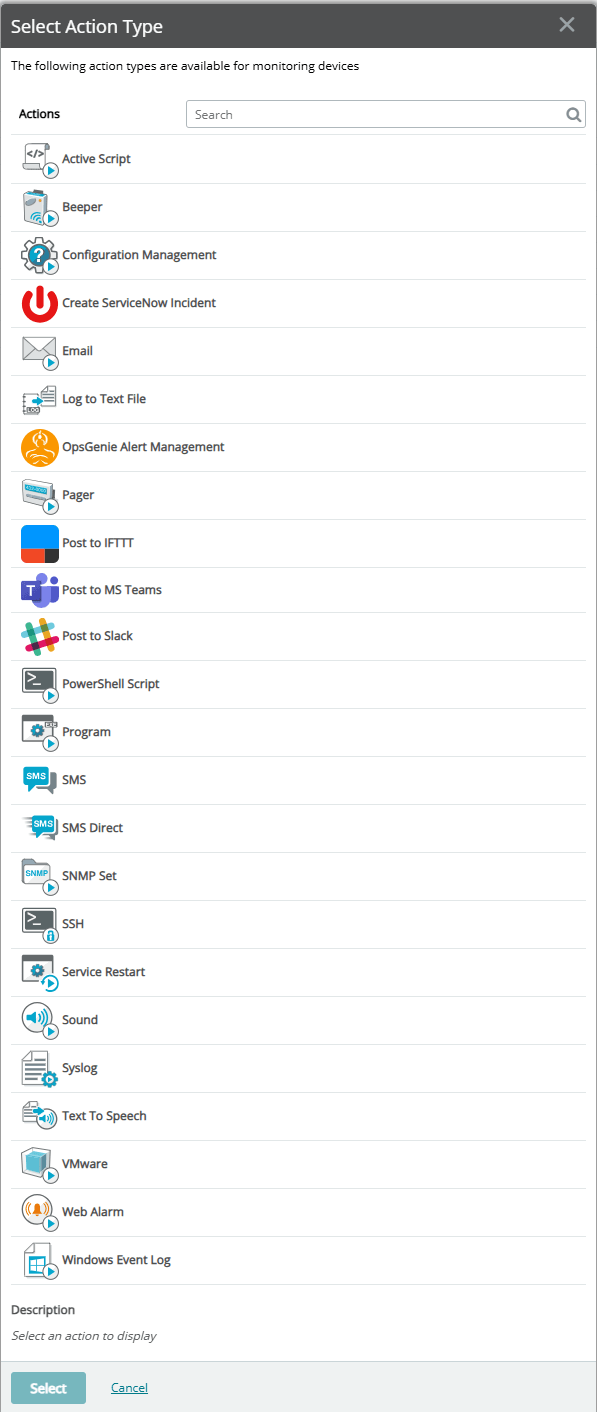
- 將 PRTG 的感測器通知觸發條件 映射到 WhatsUp Gold 的 Action Policies(可用性) 以及 Alert Center(效能)通知。
- 設定 升級流程(Escalation Paths) 及多通道通知,包括 電子郵件、簡訊、Teams、Slack。
- 利用 豐富的 Action Library 執行自動化修復任務,例如 SSH、PowerShell、程式或 Script 類型的動作。
Step 4:重新建立報表與儀表板
WhatsUp Gold 提供即用型儀表板,且完全可自訂。透過 每位使用者專屬的儀表板檢視,IT 團隊可以專注於最需要立即處理的基礎設施問題。WhatsUp Gold 的每份報表(包含儀表板)都可以輕鬆 匯出成各種檔案格式,也可以設定排程,由 現代且更安全的 OAuth 2.0 授權框架 發送報表。
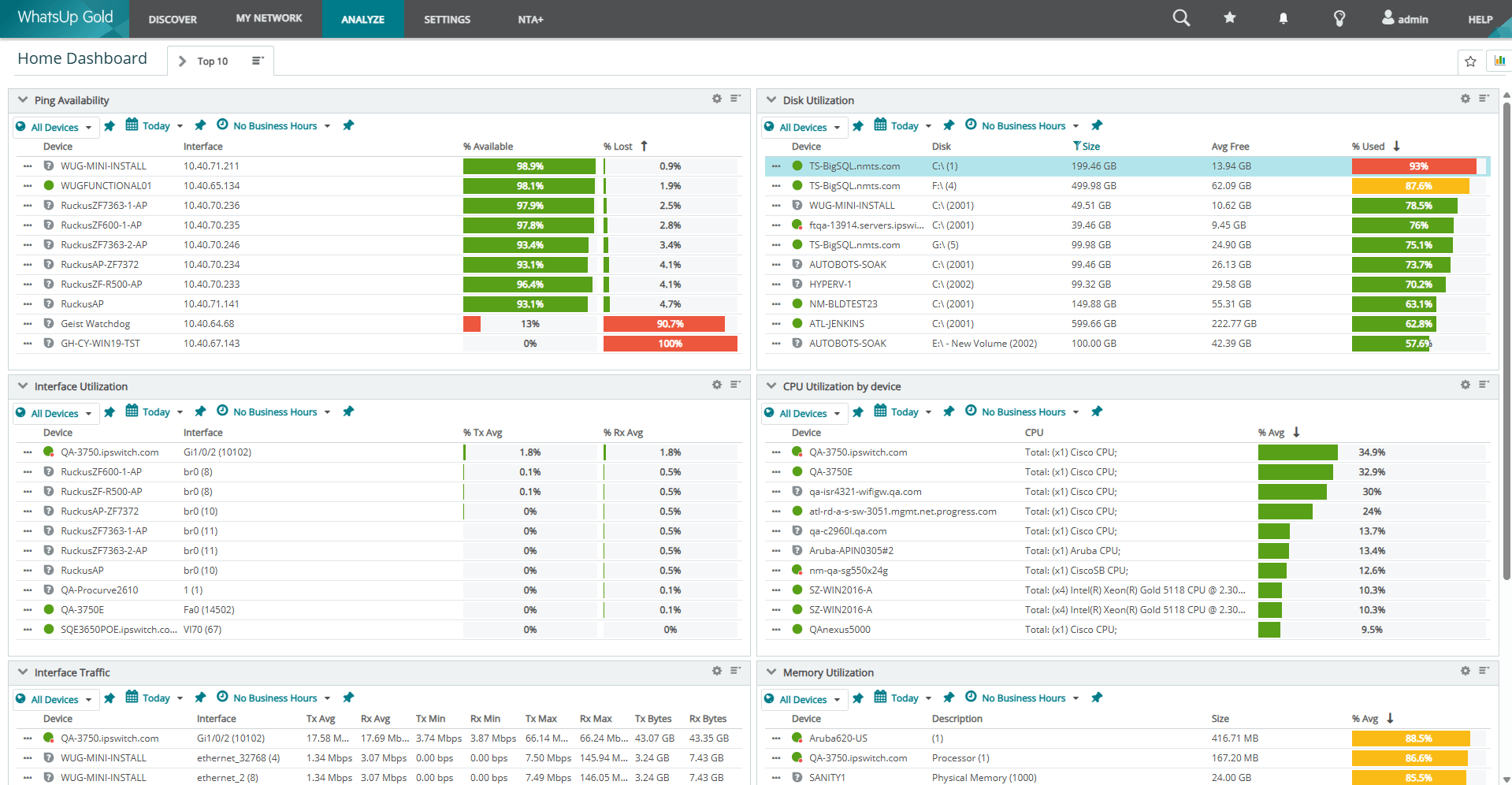
- 使用 WhatsUp Gold 的儀表板、裝置群組地圖檢視(Device Group Map Views) 以及即時可用的 全頁報表(Out-of-the-Box Full Page Reports),重建 PRTG 的關鍵「魔法地圖(Magic Maps)」。
- 建立 角色專屬儀表板(Role-Based Dashboards) 以及 NOC Viewer 投影片,讓 NOC 團隊、管理員與高階主管都能輕鬆掌握網路運作狀況。
- 利用 WhatsUp Gold 的排程報表匯出功能,滿足合規、稽核以及每日/每週更新需求。
Step 5:驗證監控覆蓋範圍
進行缺口分析,以確認所有關鍵裝置與服務均已被監控。
- 將 WhatsUp Gold 的裝置授權模式與 PRTG 的感測器模式進行比較,以評估成本效益。在我的實驗環境中,我大約有 1,000 個感測器;使用 WhatsUp Gold 掃描後,對應到約 70 台裝置,其中只有 26 台擁有有效憑證,是我真正需要監控的。WhatsUp Gold 的自動探索功能能確保只有在需要時才會消耗授權。這 26 台裝置就可以監控成千上萬的項目或通道,授權方式允許如此操作。
- 確認您已監控所有對組織業務與營運至關重要的項目。使用 WhatsUp Gold 的 Monitor Library 重建任何缺失的感測器,例如 Windows 服務監控、Windows 或 Linux 程序監控、SSL 憑證監控、HTTPS 內容監控、WMI 監控、SNMP 表格監控,並探索 WhatsUp Gold 豐富的即用型監控庫。
PRTG 與 WhatsUp Gold 名詞對照表
| PRTG Term | WhatsUp Gold Equivalent |
|---|---|
| Sensor | Active Monitor, Performance Monitor, Passive Monitor |
| Probe | Scalability Poller, Additional instance, Central/Remote |
| Notification | Actions, Action Policies, Alert Center |
| Device Tree | Device Groups |
| Auto discover groups | Scheduled Discoveries with automated workflows |
| Tickets | Third-party ticketing system integration |
| Devices | Devices (main aggregation point for active, passive, performance monitors) |
| Dependencies | Dependencies within WhatsUp Gold can be set automatically as well as customized, either for down or up dependency |
| Add Group | WhatsUp Gold Device Groups can be added by right-clicking in the Device Group list and selecting "New Group" |
| Add Auto-Discovery Group | WhatsUp Gold has a separate Discovery vs. Monitoring section. The “Discover” navigation menu item shows every system you’ve ever discovered. You get to choose which devices you monitor, which then show in the “My Network” navigation menu item. By combining these WUG functionalities, you achieve the same functionality with more flexible options. |
| Add Device | My Network -> Add Device from either right-click menu on a device group or selecting a device group and left-clicking the hamburger menu |
| Libraries | Device Groups for reporting/access |
| Top 10 Lists, Current Value, Historic Data, etc. | Dashboards & Reports with prebuilt & customizable filters |
| Similar sensors | Not required, WhatsUp Gold works hard to ensure you get the most out of your license |
| Tags | Device Attributes can be used to achieve tag-like functionality |
| Alarms | Dashboards displaying current issues, web alarm panel with acknowledgement, reports |
| Map | Device Groups, each with an automatic and custom network topology. These groups can then be displayed on dashboards & reports in various ways |
| Reports | Analyze navigation menu item has all pre-canned reports categorized by type. Each dashboard can have any report item displayed. You can also search for reports in the global search in top right corner. |
| Logs | WhatsUp Gold has categorized system logs as well as Log Management capabilities that leverage the Elastic event collection stack with the ability to ingest both Windows Events & Syslogs |
| Object History | Web User Activity Log |
| Setup | “Settings” nav menu item leads you to categorized configuration options. |
| PRTG Multiboard | WhatsUp Gold's distributed deployment option enables showing dashboard reports from multiple WhatsUp Gold instances on a single web UI view |
| PRTG Apps | WhatsUp Gold 360 allows you to securely sync your monitoring information to the cloud and access it via any web browser on https://portal.whatsupgold.com |
| Auto Update | WhatsUp Gold notifies you when a new release or update is available, but updating involves manual steps. whatsupgold.com/lifecycle to learn more about release frequency. |
| Dark Mode |
WhatsUp Gold’s Dark Mode is a per-user setting access via User Preferences
|
| 100 sensors for free | WhatsUp Gold Free Edition (up to 10 devices, core functions only) |
| SSO | WhatsUp Gold’s equivalent is the OpenID Connect integration. WhatsUp Gold has been certified to work with Azure EntraID (formerly Active Directory), Okta, Auth0, and Active Directory Federation Service (AS FS) for Windows Server 2019 |
| PRTG desktop app | WhatsUp Gold’s ultra-fast and optimized web application can be used, no desktop app required |
| PRTG For IOS/Android | WhatsUp Gold does not have an official IOS/Android application, Instead, WhatsUp Gold 360, a cloud-hosted web application makes your data accessible from any system with a web browser by accessing https://portal.whatsupgold.com |
| Notification Delivery | WhatsUp Gold Email Actions and Notifications allow specific delivery mechanisms to be configured on a per-action basis. You can configure as many actions as you choose an associate these to active monitor state changes, device state changes, and passive monitor events |
| Notification Contacts | WhatsUp Gold’s action library enables per-action configuration for email, SMS, and other notification types |
| Schedules | WhatsUp Gold has multiple scheduled operation capabilities including Maintenance Schedules, Blackout Schedules, Discovery scan schedules, & Recurring Actions |
| Cores & Probes | WhatsUp Gold’s poller information can be viewed from Settings -> System Settings -> Polling Configuration. The “Poller Health” dashboard report displays poller status & performance information. |
| Scanning intervals | WhatsUp Gold’s polling intervals can be configured from anywhere to 10 seconds to 1 day. Default collection interval for active monitors is 60 seconds, for performance monitors 10 minutes. |
| Unusual detection | WhatsUp Gold alert center thresholds enable you to be notified in the event any performance threshold is greater than expected. |
| Administrative Tools for the PRTG Core Server | WhatsUp Gold includes “WUGMD” application collects & prepares information relevant to supporting your environment so you can pass it to Progress technical support in a case. To start/stop/restart any specific service, you can navigate to Settings -> System Services. All of WhatsUp Gold’s configuration & monitoring data is stored in a MS SQL Database and can be backed up and restored as required |
| Experimental features | WhatsUp Gold’s betas are controlled through our Customer Validation Program, which is free to join once you a customer. The CVP also offers a way for customers to provide their ideas & feedback as we show our early UX designs, what the development team is currently working on, and more. |
PRTG vs WhatsUp Gold
| 特徵 | PRTG | WhatsUp Gold |
|---|---|---|
| 網路發現與映射 | 基於感測器的手動分組 | 利用動態拓樸圖實現第 2/3 層自動化發現 |
| 警報和通知 | 基本觸發機制,有限升級 | 進階操作策略、多管道(電子郵件、簡訊、Teams、Slack)、自動補救 |
| 報告和儀表板 | 靜態報告,自訂功能有限 | 完全可自訂的儀表板、NOC 檢視器、基於 OAuth 2.0 的定時匯出 |
| 許可模式 | 基於感測器的(複雜,大規模應用成本高) | 基於設備的(更簡單、更可預測) |
| 安全與合規 | 有限的 | 整合 NDR、日誌管理和設定管理 |
| 可擴展性 | 分散式環境的複雜設置 | Enterprise Plus 可輕鬆支援大型分散式環境。 |
| 使用者介面 | 基於表單的網頁使用者介面和選單項目過多 | 專為 IT 團隊開發的直覺、快速的 Web 應用程式 |
為什麼選擇切換
- 簡化授權:WhatsUp Gold 採用裝置授權模式,避免了感測器數量帶來的複雜性。
- 統一平台:整合網路效能監控(Network Performance Monitoring)、應用程式監控(Application Monitoring)以及網路偵測與回應(NDR)功能於單一解決方案。
- 易用性:直覺、快速的使用者介面,以及比 PRTG 配置繁重的環境更快的部署速度。
- 報表體驗不佳的問題:你不應該為了產出網路報表而浪費時間。當無法即時生成報表時,如何向主管展示網路狀況?
- 可擴展性:Enterprise Plus 版本支援大型、分散式環境,且不需額外成本,同時減少管理負擔。
IT 專業人士如何看 PRTG 和 WhatsUp Gold
-
PRTG 的痛點:感測器授權複雜、報表生成慢、UI 使用不便。
WhatsUp Gold 的優勢:部署快速、儀表板直覺、授權成本可預測、整合安全功能。
還在考慮其他工具?以下是 WhatsUp Gold 脫穎而出的原因
如果你正在考慮其他工具,如 SolarWinds、Nagios、Zabbix、NetCrunch,WhatsUp Gold 提供:
- 更簡單的遷移流程:自動探索與憑證管理。
- 統一平台:整合網路、應用程式與安全監控。
- 裝置授權模式:成本可預測、管理簡單。
授權概覽
WhatsUp Gold 的授權結構旨在幫助客戶輕鬆選擇最符合需求的解決方案。WhatsUp Gold 提供 訂閱制(Subscription) 或 永久授權(Perpetual License) 選項:
WhatsUp Gold 訂閱制(Subscription)
-
Business(商業版):
適合中小型企業,IT 基礎設施持續成長。包含所有標準網路監控功能,以及 10/5 的電子郵件支援。 -
Enterprise(企業版):
適合擁有複雜 IT 基礎設施、需要進階網路監控的企業。
包含 Business 版本的所有功能,可監控最多 50,000 台裝置,並支援 日誌管理(Log Management)、網際網路連線監控(Internet Connection Monitoring)、應用程式與虛擬化監控,最多可安裝 兩套 WhatsUp Gold,並提供 24/5 電話與電子郵件支援。 -
Enterprise Plus(企業進階版):
適合大型組織,需要功能強大且可擴充的監控解決方案。
包含 Enterprise 版本的所有功能,可監控最多 100,000 台裝置,支援 Network Traffic Analysis Plus (NTA+)、配置管理(Configuration Management),並可安裝 最多四套 WhatsUp Gold。
WhatsUp Gold 永久授權(Perpetual)
-
Premium(高級版):
適合中小型企業,核心功能完整,可選擇附加套件:Network Traffic Analysis、Application Performance Monitoring、Virtual Monitoring、Configuration Management、Log Management。 -
Total Plus(全功能進階版):
適合需要強大且靈活監控解決方案的組織。
Total Plus 為 一體化套件,包含所有 Premium 功能及所有附加套件。
為什麼選擇 Enterprise Plus 作為遷移方案?
- 簡化授權:避免附加套件複雜性
- 包含進階功能:如 NTA+、配置管理與 NDR
- 易於擴展:適合分散式、高可用性環境
常見問題解答
問:WhatsUp Gold 支援混合環境嗎?
答:支援,能提供 內部部署、雲端及分散式網路 的完整可視性。
問:裝置授權(Device-Based Licensing)是如何運作的?
答:按 裝置數量計費,而非感測器數量。例如,每台裝置可以監控數千個指標而不需額外費用。
問:可以整合工單系統嗎?
答:可以,WhatsUp Gold 支援 第三方工單系統整合。
問:是否提供免費評估或免費版本?
答:提供,可使用 WhatsUp Gold Enterprise Plus 評估版(最多 2,000 台裝置),或 免費版(最多 10 台裝置)。
問:WhatsUp Gold 是否提供行動裝置存取?
答:有,透過 WhatsUp Gold 360 雲端入口網站(瀏覽器使用) 存取。Enterprise 與 Enterprise Plus 訂閱版均包含 WhatsUp Gold 360 存取權。
資料來源: Progress blogs