RMA Request
Repair Service Process
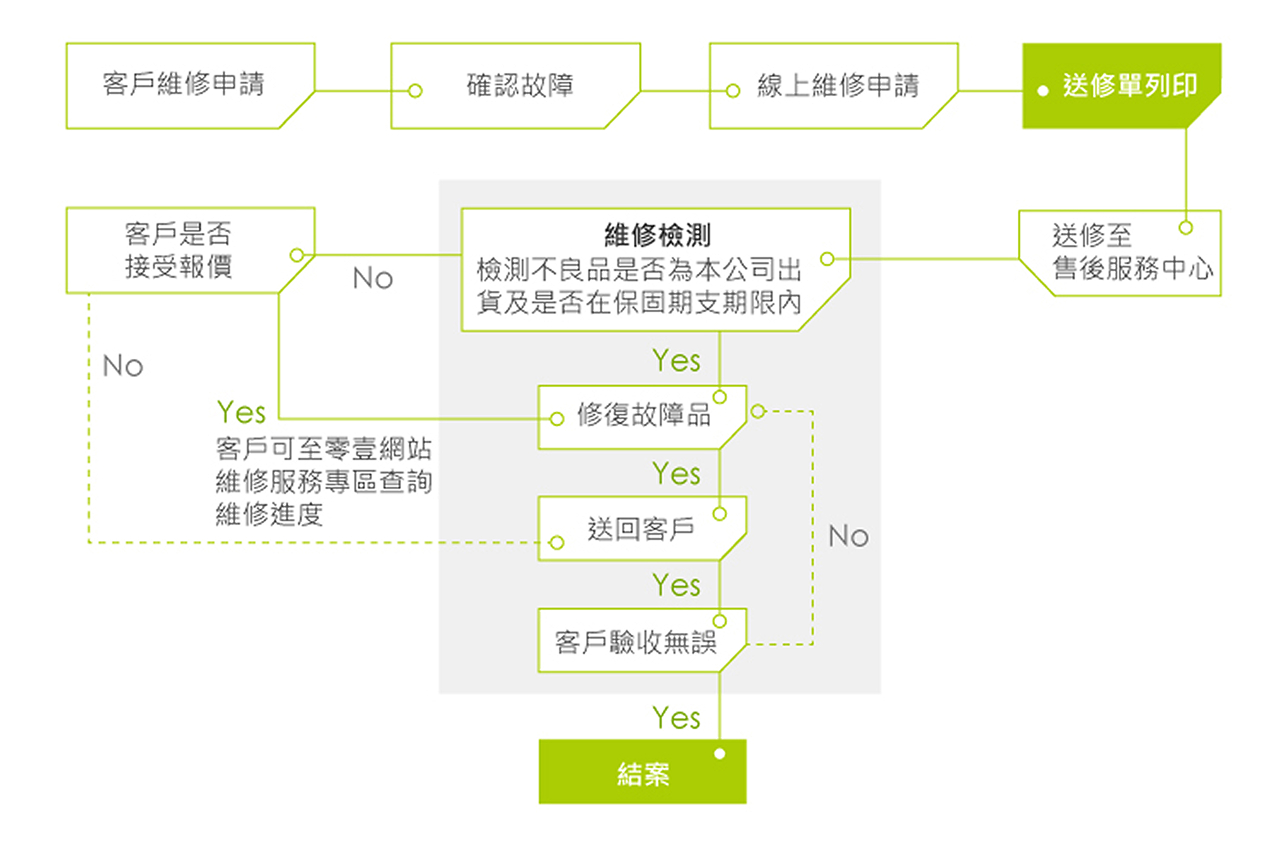
*Effective June 2, 2018, repair services for ZOT Print Servers have been transferred to ZOTECH Co., Ltd. Once a device is confirmed as defective by the Service Center via phone, customers should submit an online Repair Request through the Zero One corporate website (Repair Services). Upon completion of the repair, the Service Center will return the item to the customer.
-

1 Customer Repair Request
-

2 Confirm Issue
-

3 Online Repair Request
-

4 Confirm Repair Quotation
Subject to whether the product was originally supplied by the Company and whether it is within the warranty period.
-

5 Customer Acceptance
-

6 Repair Completed
Process Description
- During the warranty period, services are provided free of charge. This does not include accessories (such as power adapters) or damage caused by natural disasters (e.g., water damage).
- If paid repair is required, the Company will provide a quotation in advance, and the customer may decide whether to proceed with the repair.
- Customers may check the repair status by entering the repair number, or by using the contact person’s email address and mobile phone number.
- Promotional gifts are excluded from the Company’s service scope. Please contact the respective manufacturer for after-sales support.
-
Repair Hotline
-
Repair Shipping Address
5 F., No. 5, Aly. 22, Ln. 513, Ruiguang Rd., Neihu Dist., Taipei City 114, Taiwan (R.O.C.)
Attn: After-Sales Service Center, Zero One Technology